Gambas towards 2.0
By: Luigi Paiella - software [ aa tt ] pajella [ dd oo tt ] com
First published Saturday December 02, 2006
Gambas
is a wonderful, easy IDE (Integrated Development Environment )
that lets you build visual (and not visual) applications for
Linux very, very quickly.
The initial release was made on
2002, and release 1.0 was available in January 2005.
Bug
fixing continues on version 1.0.x (the actual release is 1.0.17),
while its author, Benoît Minisini, started the development
version, Gambas2, with the 1.9.x revision number.
Installation
Gambas
download
page contains the compressed source code,
but also binary versions for many different distributions. If you
are using, like me, a Debian based distribution, the installation
is pretty simple: add the line
deb
				http://apt.linex.org/linex/gambas/1.9.43/sid/ ./
to
the "/etc/apt/sources.list" file, and run your favorite
packaging manager.
For examples, with Synaptic
you can press "Reload" to update the list of available
packages, search for "gambas2" packages, and install
them all. At the end, you will find "Gambas2" in the
Development group of your KDE menu.
Gambas2 can be installed
in parallel with Gambas 1.0. No fear of interfering with your
Gambas "production" environment: the executables,
libraries and components have different names and are totally
separated.
New features
Gambas2
contains visible improvements everywhere, even in the very first
window: the "Open project..." dialog, in fact, now
contains an information window showing application's icon,
version, title, description, and authors. Many examples have been
added with more code ready to be reused.
In add, the "New
Project" wizard make easier choosing the type of project you
are going to start: graphical with QT, graphical with GTK+,
command line based or SDL application. Some options provide
automatically to the new project the needed components.

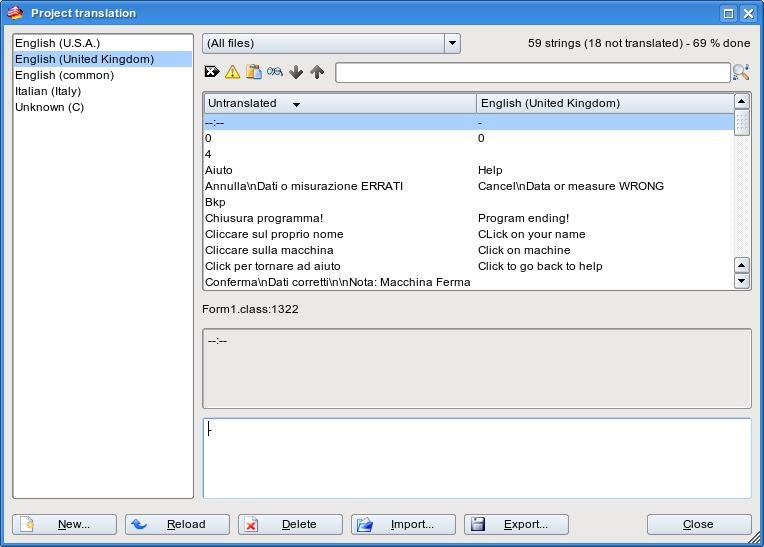
Once opened a project, instead of multiple windows, the environment present itself in a clean and intuitive MDI (Multiple Document Interface) form: all the windows (Project, Properties, Toolbox, Hierarchy, but not Console) are contained in the main window and are visible at once; functions keys can show or hide them. Also the project translation window (no longer available in the project property window but in the project menu) has been improved and makes finally clear which languages are already available in the project.
Another big improvement is the introduction of
the new graphical GTK+ toolkit component. Gambas 1.0.x has, in
fact, graphical user interface classes based exclusively on QT.
In general, QT is a good choice: it performs in a solid way,
its controls are well shaped, and all of them are fully
functional in Gambas, but the license of the freely available QT
version (the one contained in Gambas and Gambas2) does require
you to develop open source software only.
If you want to make
a commercial application in Gambas 1.0.x, you have to purchase a
QT license, or to make a just console based application.
Now,
GTK+ (whose license allows commercial software creation) permits
to Gambas2 developers a wider licensing option.
Unfortunately
the development of the GTK+ component is not complete, and even
if, in theory, selecting gb.gtk in the component window would be
enough to switch from QT to GTK+, in reality, some aspects are
not yet working and others require some adjustment.
For
example, the ListView component is not fully usable because the
most part of the methods are not working yet, even if they are
shown as available.
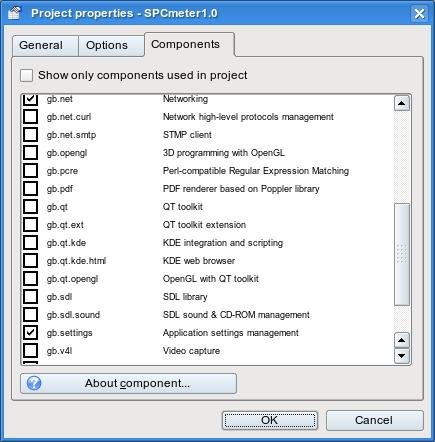
The list of Gambas2 new components is very interesting. In particular there are: gb.crypt (to let you cipher and decipher through DES or MD5 algorithm), gb.form.mdi (to handle MDI projects), gb.pcrs (it provides regular expression matching compatible with Perl to enable sophisticate data parsing), gb.pdf (a PDF render component based on Poppler library), gb.opengl (for OpenGL graphics), and gb.net.smtp to send email (client side) from gambas application's via SMTP.
In add, now, it's possible to save string arrays in a configuration file, there is an experimental support for component development, and help based on a static version of Gambas Wiki accessible through an external browser. Arguments can now be given to the application through options in the debug menu and can be quickly enabled and disabled.
Also "Database Manager" tool has been
improved with a new dialog to allow an easy import of CSV files.
Last but not least, mouse selection now supports copy and
paste.
Projects migration
The projects need to be recompiled completely,
not only when switching from Gambas to Gambas2 but frequently
even between two consecutive Gambas2 revisions. Compile does
require a short time and, usually the code compiles straight, but
in some cases the changes introduced in Gambas2 structure do
require some adjustment.
The first thing I found while
converting my projects is that settings stored in a configuration
file now require a specific component (gb.settings)
to be added to the project while in Gambas 1.0.x settings were
available out of the box. Another small difficulty is that the
system.Home
property (used to identify the user home directory) doesn't exist
anymore: more logically, in fact, the property has become
user.Home. A
simple search and replace (by the way made trough the new
improved searching interface) did the trick: at this point my
applications could start.
Global evaluation
Gambas has undergone a deep improvement and the effort and assiduity put by Benoît and the other developers is consistent: 23 releases just in 2006 !
Many new features have been added but still keeping it a simple language, supported by an active community of developers and users.
As per my personal wish list, I would like to have the possibility to create a standalone package containing the application, the interpreter, and needed libraries in a static form to be able to move quickly one application from one computer to another, without the need to install Gambas environment.
In add, I'd like to see a Windows(tm) version of Gambas: Gambas is very suitable for small applications that sometimes don't require setting up a full Linux box, and, on the other side, I'm sure that a simple but performant Visual Basic (tm) like language would be very appreciated on Windows(tm) and would move more people to the benefit of open source.
software [ aa tt ] pajella [ dd oo tt ] com © 2006